AI 기반 번역
OpenAI, Google Gemini 또는 DeepL을 사용하여 메타데이터를 30개 이상의 언어로 번역하세요.
메타데이터 번역 & 업데이트 관리
MetaFlow는 인디 개발자와 바이브 코더를 위한 현대적인 AI 기반 메타데이터 및 스크린샷 관리자입니다. 지루한 웹 양식에 작별을 고하고, 앱 현지화 및 게시 시간을 절약해주는 빠르고 네이티브 Mac 앱을 만나보세요.

다운로드
Metadata Translator & Updater
MetaFlow는 인디 개발자와 바이브 코더를 위한 현대적인 AI 기반 메타데이터 및 스크린샷 관리자입니다. 지루한 웹 양식에 작별을 고하고, 앱 현지화 및 게시 시간을 절약해주는 빠르고 네이티브 Mac 앱을 만나보세요.
스크린샷
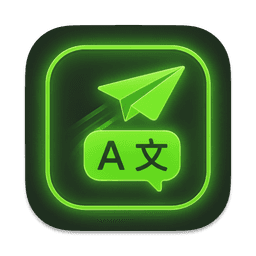
메타데이터를 번역하고, 여러 언어를 일괄 편집하고, 스크린샷을 관리하고, 웹 양식 없이 가격을 업데이트하세요.
작동 방식
MetaFlow는 App Store Connect 현지화를 연결, 번역, 스크린샷 관리, 게시의 4단계 네이티브 워크플로로 바꿔 줍니다.
App Store Connect API 키를 한 번만 추가하면 MetaFlow가 앱, 버전, 모든 로케일을 가져옵니다. 자격 증명은 macOS 키체인에 저장되며 Mac에서 벗어나지 않습니다.
이름, 부제목, 키워드, 설명을 네이티브로 편집하거나 OpenAI, Google Gemini, DeepL로 30개 이상의 언어로 번역할 수 있습니다. 게시 전에는 항상 사람이 검토합니다.
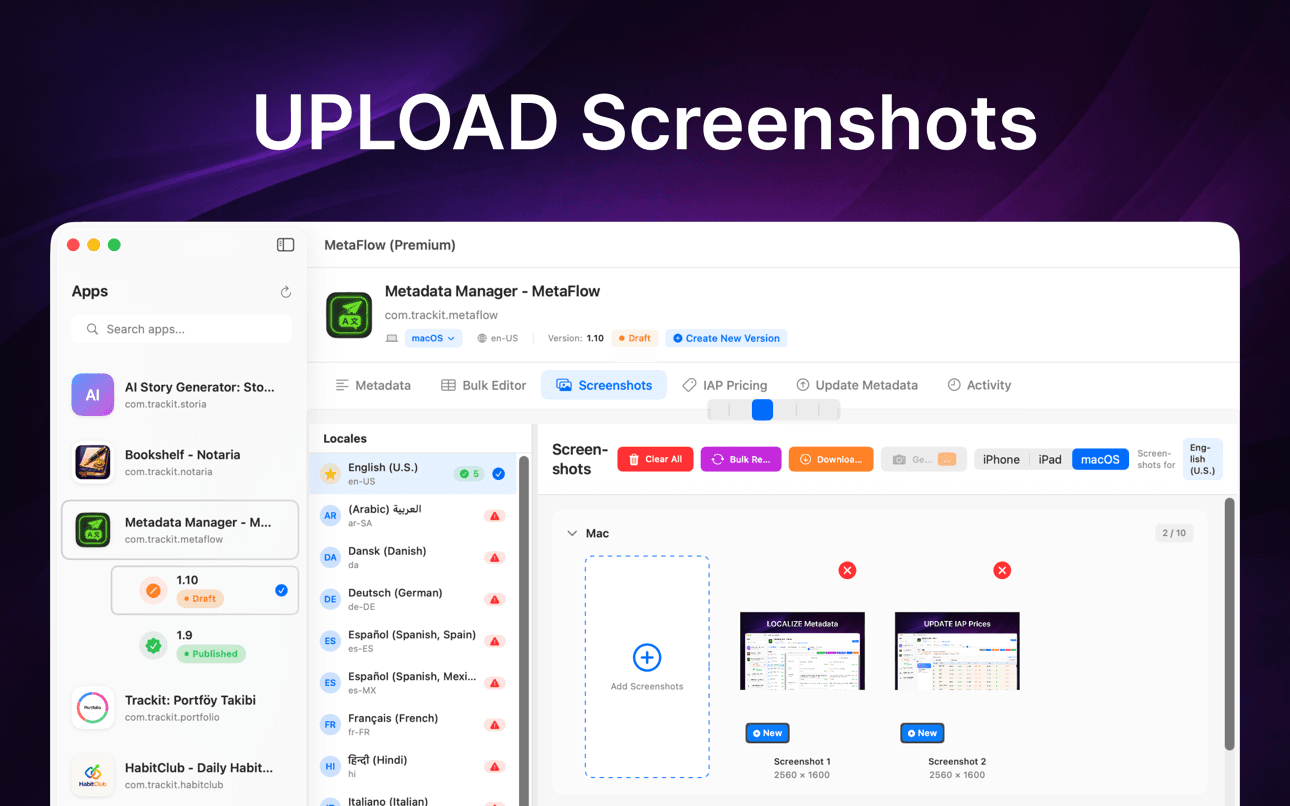
스크린샷을 드래그 앤 드롭하고 기기 그룹별로 자동 분류하며 Apple의 상속 규칙을 적용하고 모든 로케일의 기존 스크린샷을 한곳에서 내려받을 수 있습니다.
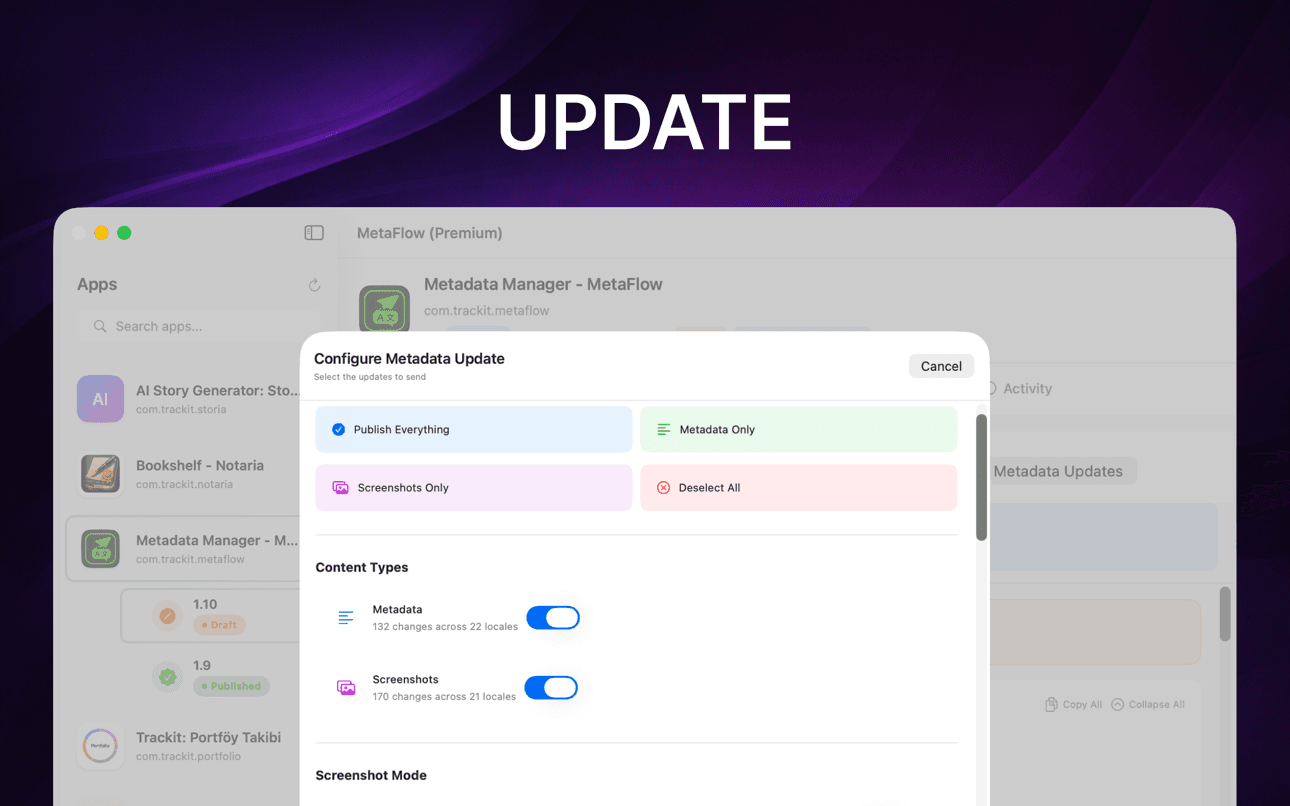
사전 검증과 드라이런 미리보기를 실행한 다음 App Store Connect API를 통해 metadata, 스크린샷, 가격을 로케일별 상태 추적과 함께 게시합니다.
어떤 점이 도움이 될까요
MetaFlow는 인디 개발자와 바이브 코더를 위한 현대적인 AI 기반 메타데이터 및 스크린샷 관리자입니다. 지루한 웹 양식에 작별을 고하고, 앱 현지화 및 게시 시간을 절약해주는 빠르고 네이티브 Mac 앱을 만나보세요.
OpenAI, Google Gemini 또는 DeepL을 사용하여 메타데이터를 30개 이상의 언어로 번역하세요.
스프레드시트 스타일 테이블에서 일괄 작업 및 유효성 검사를 통해 로케일을 편집하세요.
드래그 앤 드롭 방식으로 iPhone, iPad 및 Mac 스크린샷을 관리하세요.
변경 사항을 미리 보고, 필드를 검증하고, App Store Connect API를 통해 게시하세요.
집중적인 네이티브 Mac 워크플로우에서 현지화, 스크린샷, 유효성 검사 및 게시를 빠르게 진행하세요.
AI가 반복적인 현지화 작업을 처리하는 동안 사람의 검토를 유지하세요.
가이드
App Store 메타데이터를 현지화하고, 번역하고, 게시하기 위한 실용적이고 개발자 중심의 안내서입니다.
Localize your App Store name, subtitle, description, and keywords the right way — fields, character limits, market picks, and a faster way to ship it.
가이드 읽기How to translate an App Store description with OpenAI, Gemini, or DeepL — context prompts, character limits, review workflow, and publishing to ASC.
가이드 읽기Stop uploading screenshots locale by locale. Apple's inheritance rules, Media Manager limits, and how to bulk-upload every language from your Mac.
가이드 읽기fastlane deliver is powerful but high-maintenance. Compare GUI alternatives for App Store Connect metadata, screenshots, and publishing on macOS.
가이드 읽기Generate an App Store Connect API key in minutes: request access, pick the right role, download the .p8, find your Issuer ID, and keep it secure.
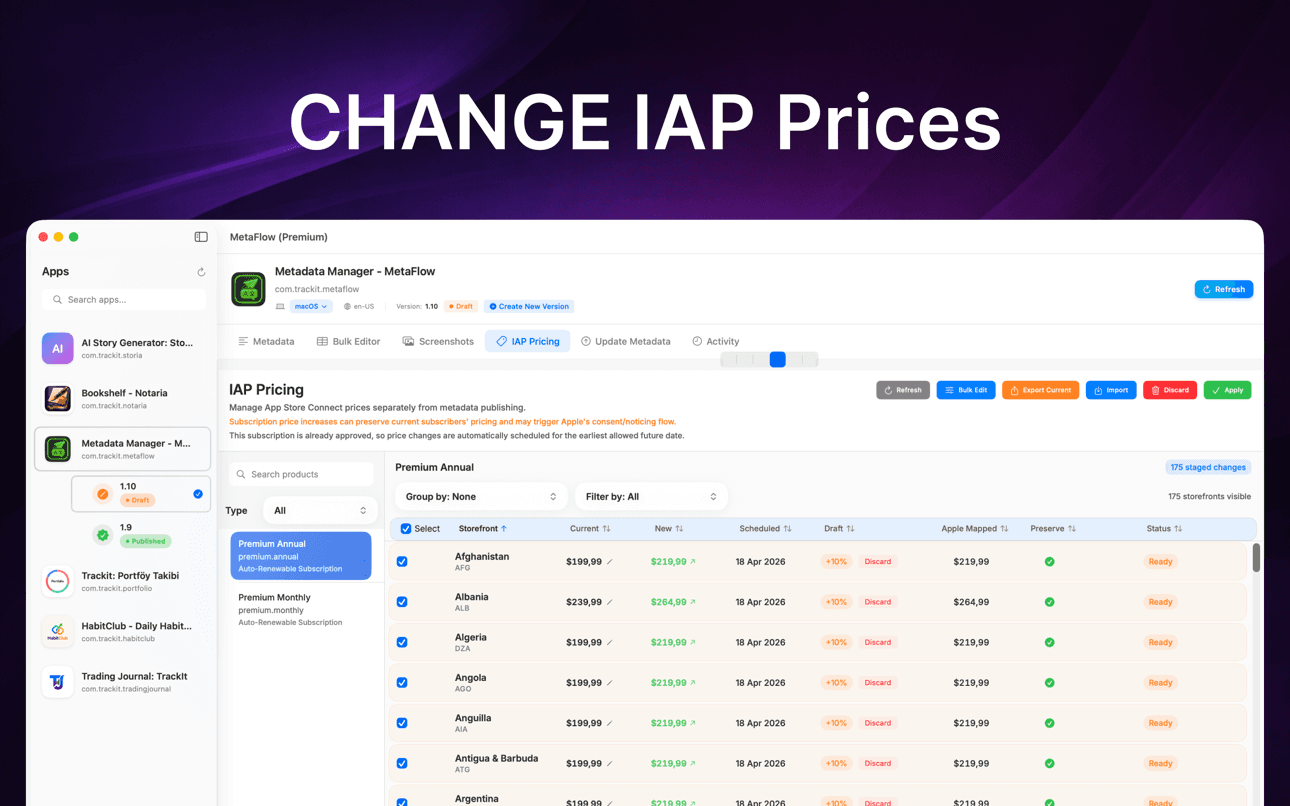
가이드 읽기Change IAP and subscription prices in App Store Connect: price tiers, scheduled changes, preserving existing subscribers, and bulk regional updates.
가이드 읽기왜 중요할까요
MetaFlow는 여러 로케일, 스크린샷, 가격 및 릴리스를 관리하는 팀과 인디 개발자를 위해 구축되었습니다.
연결된 서비스를 통해 게시하거나 번역하지 않는 한, 메타데이터, 스크린샷, 자격 증명 및 공급자 키는 Mac에 유지됩니다.
메타데이터 번역 & 업데이트 관리
MetaFlow는 인디 개발자와 바이브 코더를 위한 현대적인 AI 기반 메타데이터 및 스크린샷 관리자입니다. 지루한 웹 양식에 작별을 고하고, 앱 현지화 및 게시 시간을 절약해주는 빠르고 네이티브 Mac 앱을 만나보세요.
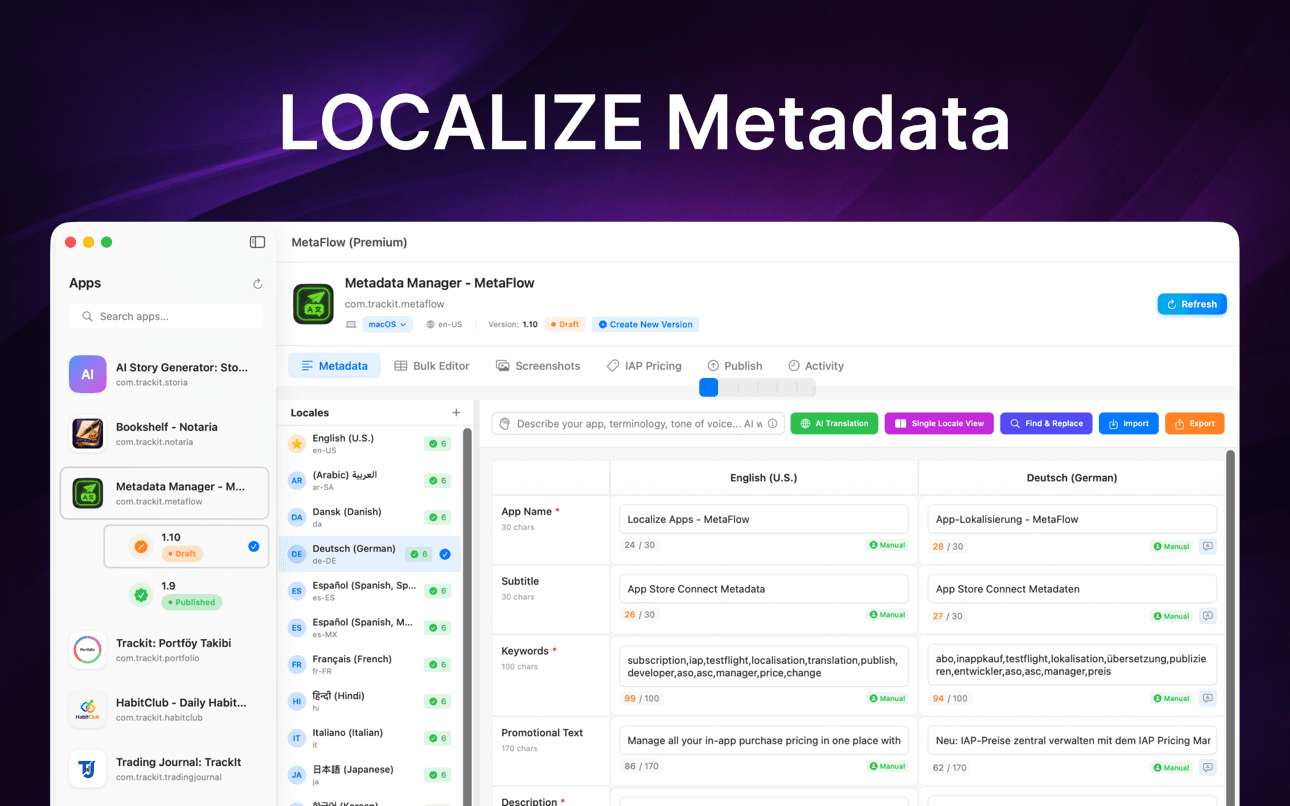
몇 분 만에 30개 이상의 언어로 메타데이터를 번역하세요. OpenAI, Google Gemini, DeepL 중에서 선택할 수 있습니다. API 키를 추가하고 바로 시작하세요. 문맥을 이해하는 번역은 앱의 특성을 파악하며, human-in-the-loop 워크플로우를 통해 사용자가 제어권을 유지할 수 있도록 합니다.
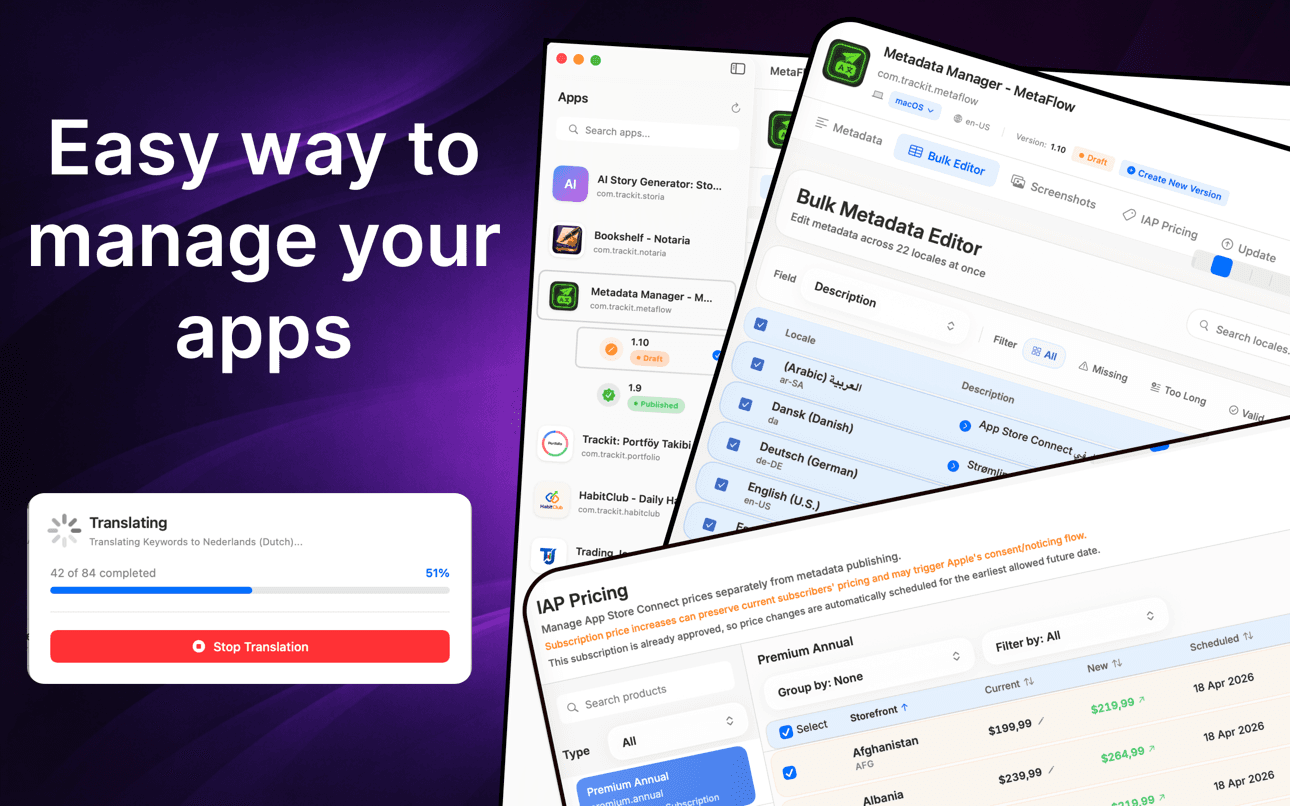
스프레드시트 스타일의 테이블 뷰에서 로케일을 편집하세요. 기본 로케일에서 모든 언어로 복사하고, 누락된 콘텐츠나 글자 수 제한으로 필터링하며, 실시간 유효성 검사를 통해 인라인 편집을 사용하세요. 일괄 작업을 위해 여러 로케일을 검색하고 선택할 수 있습니다.
Apple 기기(iPhone, iPad, Mac)를 지원합니다. 드래그 앤 드롭으로 추가하고, 기기 그룹별로 자동 분류하며, Apple의 스크린샷 상속 규칙을 활용하고, App Store Connect에서 기존 스크린샷을 다운로드할 수 있습니다.
자주 묻는 질문
MetaFlow는 OpenAI, Google Gemini, DeepL을 지원합니다. 프로젝트별로 제공업체를 선택할 수 있으며, 컨텍스트 기반 프롬프트가 앱의 용어와 어조를 모델에 전달해 번역이 직역이 아니라 자연스럽게 읽히도록 합니다.
네. MetaFlow는 자체 키 사용(BYOK) 방식을 씁니다. OpenAI, Gemini, DeepL API 키를 직접 추가하면 번역이 여러분의 계정을 통해 실행됩니다. 이렇게 하면 비용과 사용량을 직접 관리할 수 있으며, AI 번역은 선택 사항이라 키를 추가하지 않고도 metadata를 편집하고 게시할 수 있습니다.
App Store Connect API 키와 제공업체 키는 macOS 키체인에 저장되며 Mac에서 절대 벗어나지 않습니다. MetaFlow는 클라우드 동기화가 없는 로컬 우선 방식으로, MetaFlow 서버가 존재하지 않으며 게시하거나 번역하기로 선택하지 않는 한 자격 증명과 metadata는 여러분의 컴퓨터에 남습니다. MetaFlow는 앱 개선을 위해 제품 분석 데이터(앱 버전, 기능 사용, IP 기반 대략적 위치)를 전송하지만, metadata, 스크린샷, 키는 절대 포함되지 않습니다.
MetaFlow는 App Store Connect가 제공하는 현지화 필드, 즉 앱 이름, 부제목, 키워드, 프로모션 텍스트, 설명, 새로운 기능을 편집합니다. 각 필드에 실시간 글자 수 카운터와 검증이 있어 Apple의 제한을 넘을 일이 없습니다.
네. Apple의 상속 규칙에 따라 기기 및 로케일별로 스크린샷을 드래그 앤 드롭할 수 있고, 앱 내 구입 및 구독 가격을 백분율, 등급, 수동 값으로 일괄 업데이트할 수 있습니다. 예약된 변경과 기존 구독자의 가격 유지도 지원합니다.
MetaFlow는 Mac App Store에서 무료로 내려받을 수 있으며, 무료 등급에서 편집, AI 번역, 스크린샷, 게시 등 모든 기능으로 첫 번째 앱을 관리할 수 있습니다. MetaFlow Premium은 앱 수 제한을 해제하는 인앱 구독입니다. macOS 14.0 이상과 API 접근 권한이 있는 App Store Connect 계정이 필요합니다. AI 번역 제공업체는 여러분의 API 키를 통해 요금을 청구합니다.
MetaFlow는 무엇이 바뀔지 정확히 보여 주는 사전 검증과 드라이런 미리보기를 실행한 다음, App Store Connect API를 통해 로케일별로 상세한 상태 추적과 함께 게시합니다. 버전을 인식하는 편집이 초안과 게시됨 상태를 처리하므로 무엇이 게시될지 항상 알 수 있습니다.